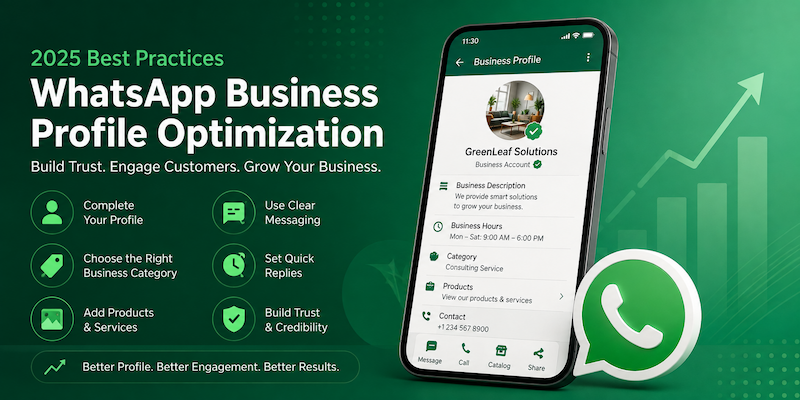
Quick Answer: WhatsApp Business profile optimization means setting up your business name, photo, category, description, hours, catalog, and quick replies so customers trust you and reply faster. In 2025, a complete and verified profile gets more clicks, more replies, and more sales than a half-filled one. The fastest wins are a clear profile photo, a short description with your main service, correct business hours, and a working catalog link.
More than 200 million businesses use WhatsApp Business every month. Most of them never finish setting up their profile. That’s a missed chance, because your WhatsApp profile is often the first thing a customer checks before they message you or buy from you.
This guide walks through WhatsApp Business profile optimization best practices for 2025, step by step, in plain language. No jargon. No fluff. Just what works.
Table of Contents
Why So Many Businesses Get This Wrong
Most business owners download WhatsApp Business, add a name and a photo, and stop there. It works well enough at first, so the profile never gets a second look. Then the business grows, more people join the team, and the profile is still the same rough draft from day one.
The problem isn’t effort. It’s that nobody explains what a finished WhatsApp Business profile actually looks like. There’s no checklist taped to the wall. This guide is meant to be that checklist.
A well optimized WhatsApp business account setup also makes life easier for your team. New staff can read the catalog, quick replies, and labels and understand how the business runs on WhatsApp without asking a manager every five minutes.
What Is WhatsApp Business Profile Optimization?
Definition: WhatsApp Business profile optimization is the process of completing and improving every part of your WhatsApp Business profile, including your photo, name, category, description, address, hours, catalog, and automated messages, so it builds trust and answers customer questions before they even ask.
Think of your WhatsApp profile like a small storefront window. If it’s empty, people walk past. If it’s clear and inviting, they stop and come in.
Why Profile Optimization Matters in 2025
WhatsApp has changed a lot over the past two years. It’s no longer just a chat app. It’s now a full sales and support channel, especially for small and mid-size businesses.
Key Takeaway: A fully optimized WhatsApp Business profile can reduce repeat questions by up to half, because customers find hours, location, and product details without asking. This means faster replies, happier customers, and less time spent typing the same answer.
Here’s what changed recently that makes this more important:
- WhatsApp now shows business profiles inside Google Search results in many countries.
- Meta added more catalog and shopping features directly inside chats.
- Customers expect a reply within minutes, not hours.
- Fake and scam accounts have made customers more careful, so a verified, complete profile stands out.
If your profile is incomplete, you’re losing trust before the conversation even starts.
Before You Start: WhatsApp Business App vs API
Many business owners aren’t sure which version of WhatsApp Business they need. Here’s a simple comparison.
| Feature | WhatsApp Business App | WhatsApp Business API |
|---|---|---|
| Best for | Solo owners, small shops | Growing teams, multiple agents |
| Cost | Free | Paid, based on conversations |
| Number of users | 1 phone, up to 4 linked devices | Multiple agents, unlimited (with a provider) |
| Automation | Basic (greeting, away message) | Advanced (chatbots, CRM integration) |
| Green tick verification | Rare, harder to get | More common for verified brands |
| Setup difficulty | Easy, download and go | Needs a provider or developer |
If you’re a small business just starting out, the free app is enough. If you’re handling hundreds of chats a day, the API is worth the cost.
One thing to remember: profile optimization steps are almost identical on both versions. The fields, like description, category, and hours, work the same way. The difference is who manages them and how many people can reply at once. So don’t wait until you move to the API to start optimizing your profile. Do it now, on whichever version you use today.
The 7 WhatsApp Business Profile Optimization Best Practices
1. Use a Clear, Real Profile Photo
Your profile photo is the first thing people see in their chat list. Use your logo if you’re a known brand, or a clear photo of your storefront or product if you’re new.
Best Practice Box:
- Use a square image, at least 500×500 pixels
- Avoid text-heavy images, they get cut off
- Keep the background simple
- Avoid stock photos that feel generic
A blurry or missing photo makes even a legitimate business look like a scam account. This matters more now than it did a few years ago, since customers have grown wary of fake sellers on messaging apps. A clear photo is one of the simplest trust signals you can give in under a minute of setup.
If you run more than one location, use a shared brand photo across all numbers so customers recognize you no matter which branch they message. Consistency across every WhatsApp business account setup you run builds recognition over time, the same way a consistent logo does on a storefront.
2. Pick the Right Business Category
WhatsApp lets you choose a category like “Retail,” “Local Service,” or “Health & Beauty.” This helps WhatsApp show your business correctly in search and helps customers understand what you do in one glance.
Go to Settings > Business Tools > Business Profile > Category and pick the closest match. Don’t leave it as “Other.”
WhatsApp uses this category, along with your description, to understand what your business does. This matters for how your profile appears when customers search for local businesses or click through from a Google listing. A vague or wrong category can put your profile in front of the wrong audience entirely, which wastes both your time and the customer’s.
If you offer more than one type of service, pick the category that matches your main revenue source, not your side offerings. You can always mention secondary services inside your description or catalog.
3. Write a Short, Honest Business Description
Your description has a 139-character limit. Use it to say what you do and who you help, not a sales pitch.
Weak example: “Best service in town, call now, amazing deals!”
Strong example: “Home cleaning service in Dubai. Same-day booking. Trained, background-checked staff.”
The second one tells the customer exactly what to expect. That’s what builds trust.
Think about the three or four questions customers always ask before they buy. Your description should answer at least one of them upfront. For a restaurant, that might be delivery area. For a clinic, that might be whether walk-ins are accepted. This small habit turns your description into a mini FAQ instead of empty marketing language.
Avoid words like “best,” “amazing,” or “guaranteed” unless you can actually back them up. Customers scroll past exaggerated claims. Specific, honest language reads as more credible and performs better in practice.
4. Add Accurate Business Hours and Location
Nothing frustrates a customer more than messaging a business that says it’s open, only to get no reply for six hours. Set your real hours in Business Hours settings and turn on the “Always Open” or specific schedule option.
If you have a physical location, add your address and pin your exact location on the map inside the app. This also helps you show up in local search.
For businesses without a fixed storefront, like home services or delivery-only kitchens, you can skip the exact address and instead mention your service area in the description, for example, “Serving Downtown Dubai and Business Bay.”
Keep your hours updated around holidays and special closures. An outdated schedule is one of the top reasons customers message a business, get no reply, and never message again. It only takes a minute to update, but it protects the trust you’ve already built.
5. Build a Simple, Clean Catalog
The catalog feature lets customers browse products or services without leaving the chat. You don’t need professional photos, but you do need clear ones.
Numbered steps to set up your catalog:
- Open Business Tools and tap Catalog
- Tap Add New Item
- Upload a clear photo (natural light works best)
- Add the product name and price
- Write a short, honest description
- Repeat for your top 10 to 20 items first
- Update prices and stock regularly
A catalog with 5 outdated items looks worse than no catalog at all. Keep it current.
WhatsApp catalog optimization isn’t just about photos and prices. Group similar items so customers can browse the way they would in a physical shop, for example grouping cakes by flavor or services by category. This small structure reduces the “do you have…” messages you’d otherwise get one at a time.
You can also link individual catalog items directly in chat, which saves you from retyping product details every time someone asks. This alone can cut response time significantly for businesses that sell more than a handful of products.
6. Set Up a Greeting Message and Quick Replies
When someone messages you for the first time, or after 14 days of no contact, WhatsApp can send an automatic greeting. Use this to say thank you and set expectations.
Example greeting: “Hi! Thanks for reaching out to [Business Name]. We usually reply within 30 minutes during business hours.”
Quick Replies save time for repeated questions like pricing, shipping, or store hours. Set these up under Business Tools > Quick Replies using a short shortcut like “/hours” or “/price.”
Write your greeting and quick replies the way you’d actually talk to a customer in person. Overly formal language feels cold on a chat app. WhatsApp is a conversational channel, and your automated messages should still sound like a real person wrote them, not a legal notice.
Review your quick replies every couple of months. As your products, prices, or policies change, outdated quick replies can send a customer the wrong information without anyone noticing until a complaint comes in.
7. Use Labels to Stay Organized
Labels let you tag chats as “New Customer,” “Pending Payment,” “Order Placed,” and so on. This isn’t visible to customers, but it directly affects how fast and accurately you reply, which customers do notice.
Best Practice Box:
- Keep labels to 5 or 6 categories max
- Review and update labels weekly
- Use labels before you scale to a team, not after
Real Example: A Small Bakery’s Profile Fix
A home bakery in Dubai had a WhatsApp Business profile with no photo, no hours, and no catalog. Customers kept asking the same three questions: “Are you open today?”, “What flavors do you have?”, and “How much for a 1kg cake?”
After adding a profile photo, setting business hours, and building a 12-item catalog with prices, the bakery reported that repeat questions dropped noticeably within a few weeks, and orders through WhatsApp increased because customers could browse and decide before messaging.
This is a common pattern. Small, specific changes to a profile change how customers behave.
How to Know If Your Optimization Is Working
You don’t need fancy analytics software to track this. WhatsApp Business already gives you basic stats under Settings > Business Tools > Statistics, showing messages sent, delivered, read, and received.
Quick Answer: Track three simple numbers each month: how many chats you receive, how many repeat questions you get about hours or pricing, and how fast your team replies. If repeat questions drop and reply time improves after you optimize your profile, it’s working.
Best Practice Box:
- Check your statistics monthly, not daily; daily numbers are too noisy to act on
- Note down the top 3 repeated questions each week, then fix them at the source (description, catalog, or quick replies)
- Track how many customers use the catalog link versus asking for prices manually
Tools That Support WhatsApp Business Profile Optimization
You don’t need paid software to optimize a WhatsApp Business profile, but a few tools make the job easier as you grow:
- WhatsApp Business app (free): covers profile, catalog, labels, and basic automation for most small businesses.
- Meta Business Suite: helpful if you’re also running a Facebook or Instagram business page alongside WhatsApp.
- Canva or a basic photo editor: for resizing your profile photo and catalog images to the right dimensions.
- A shared spreadsheet: simple, but effective for tracking catalog updates and quick reply changes across a team.
You don’t need all of these on day one. Start with the free app, and add tools only when your chat volume actually requires them.
Common Mistakes to Avoid
- Leaving the description blank or generic
- Using a personal photo instead of a business one
- Never updating the catalog after the first setup
- Ignoring the away message when the business is closed
- Mixing personal and business chats on the same number
- Not checking how the profile looks from a customer’s view
- Skipping labels once the business has more than one person replying
- Using the same generic greeting message for years without testing changes
- Forgetting to add a website or social link where customers expect one
Each of these mistakes is small on its own, but together they slowly erode the trust a customer needs to feel comfortable buying from you over chat.
FAQ
Is WhatsApp Business free to use? Yes, the WhatsApp Business app is free to download and use. The WhatsApp Business API has costs based on message volume and provider fees.
How do I get the green verified badge on WhatsApp Business? Meta reviews your business details and confirms your identity. Apply through Meta Business Manager; approval isn’t guaranteed for every business.
Can I use WhatsApp Business on two phones? Yes, one main phone plus up to four linked devices, including desktop and tablet, through WhatsApp Business linked devices.
How often should I update my WhatsApp catalog? Update it whenever prices, stock, or offerings change, ideally weekly for active businesses with fast-moving inventory.
What’s the character limit for a WhatsApp Business description? The business description field allows up to 139 characters, so keep your message short and specific.
Does WhatsApp Business affect Google search results? Yes, in many countries, WhatsApp business profiles and click-to-chat links can appear in Google search and Maps listings.
Can I automate replies on WhatsApp Business? Yes, the free app offers greeting and away messages. The API supports advanced chatbots and CRM-connected automation.
How many products can I add to a WhatsApp catalog? The WhatsApp Business catalog supports a large number of items, though most small businesses perform best listing their top sellers first.
Should I use my personal number for WhatsApp Business? It’s better to use a separate number so personal and business chats don’t mix, which keeps your profile and statistics cleaner.
Can customers leave reviews on WhatsApp Business? WhatsApp doesn’t have a built-in review system, so many businesses link a Google review page inside their description or catalog.
Key Takeaway Summary
- Complete every field in your profile, don’t skip any
- Update your catalog and hours regularly, not just once
- Use quick replies and labels to save time as you grow
- Match your profile tone to how you actually talk to customers
- Review your profile from a customer’s point of view every few months
For businesses managing WhatsApp alongside other channels, our guide on security company social media marketing tactics covers similar trust-building steps for other platforms. If you’re also exploring paid promotion, see our breakdown of performance marketing agency options. And for businesses layering AI tools into customer support, the role of AI in modern payment is a useful next read.
For the official rules on business profile fields and verification, see Meta’s WhatsApp Business Help Center.
Getting your WhatsApp Business profile right isn’t complicated. It just takes a little time and regular upkeep. Start with your photo, description, and hours today, then build your catalog over the next week.
Set a recurring reminder, once a month, to walk through your entire profile as if you were a new customer. Open the app, look at the photo, read the description out loud, click the catalog, and try the quick replies. This ten-minute habit catches outdated details before a customer does, and it keeps your WhatsApp business profile optimization efforts from quietly slipping backward over time.