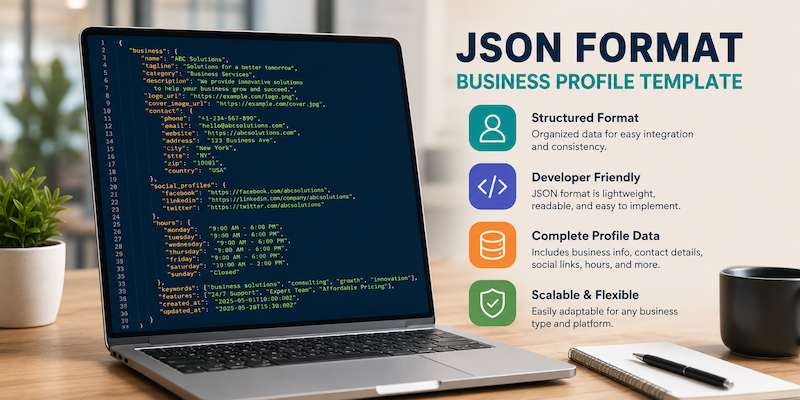
Business data is messy. Names get spelled wrong. Phone numbers sit in ten different formats. Addresses live in one spreadsheet and hours live in another. A JSON format business profile template fixes this problem by giving every piece of business data one clean home.
This guide shows you what a JSON business profile template looks like, why it matters, and how to build your own. You will also get a real, working example you can copy today.
Quick Answer
A JSON format business profile template is a structured file that stores business details such as name, address, phone number, hours, and services in a format called JSON (JavaScript Object Notation). Websites, apps, and search engines read this format easily because it uses simple key and value pairs. Most business profile templates need at least five core fields: business name, address, contact info, hours, and category.
Table of Contents
What Is a JSON Business Profile Template?
Definition: A JSON business profile template is a pre-built structure written in JSON syntax. It holds standard business information in labeled fields so that software, websites, and directories can read the data without confusion.
Think of it as a digital form. Instead of filling out boxes on paper, you fill out key and value pairs in a text file. A computer can read this file instantly and place each value in the right spot on a website or app.
JSON stands for JavaScript Object Notation. It was built for web data, but today it powers almost every modern app, API, and directory listing. If you have ever seen a Google Business Profile, a Yelp listing, or an app that shows store hours, there is a strong chance JSON sits behind that data somewhere.
Why Businesses Use JSON for Profile Data
Business owners and developers pick JSON for a few clear reasons.
- It is easy to read for both humans and machines.
- It works across almost every programming language.
- It keeps data organized in a consistent structure.
- It loads fast, which helps website speed and search visibility.
- It connects smoothly with APIs, apps, and content management systems.
A JSON business profile also helps with SEO. Search engines like Google use structured data, often written in JSON-LD, to understand what a business does, where it is located, and when it is open. This can lead to rich results, such as star ratings or business hours, showing up directly in search results.
For a related read on keeping business details consistent across platforms, see this guide on WhatsApp business profile optimization.
Key Takeaway
A clean JSON business profile format helps your business appear correctly on websites, apps, maps, and search engines. Missing or messy fields can cause wrong hours, wrong addresses, or missing listings.
Core Fields In a Business Profile JSON Format
Every solid business profile in JSON should include these fields at minimum.
| Field | Purpose | Example |
|---|---|---|
| name | Legal or trade business name | “Sunrise Bakery” |
| address | Physical location details | “12 Oak Street, Denver, CO” |
| phone | Primary contact number | “+1-303-555-0101” |
| Business email address | “hello@sunrisebakery.com” | |
| category | Type of business | “Bakery” |
| hours | Days and open/close times | “Mon-Fri 7am-6pm” |
| website | Main business URL | “https://sunrisebakery.com” |
| description | Short summary of the business | “Family-owned bakery since 1998” |
| socialLinks | Social media profile URLs | Facebook, Instagram, etc. |
| geo | Latitude and longitude | “39.7392, -104.9903” |
You do not need every field for every use case. A simple app listing may only need name, address, and phone. A full schema markup file for SEO will need more, including geo coordinates and a description.
Real Example: JSON Business Profile Template
Below is a working example of a business profile written in JSON format. You can copy this and replace the sample values with your own business details.
{
  "businessName": "Sunrise Bakery",
  "legalName": "Sunrise Bakery LLC",
  "category": "Bakery",
  "description": "Family-owned bakery serving fresh bread and pastries since 1998.",
  "address": {
    "street": "12 Oak Street",
    "city": "Denver",
    "state": "CO",
    "zip": "80202",
    "country": "USA"
  },
  "contact": {
    "phone": "+1-303-555-0101",
    "email": "hello@sunrisebakery.com",
    "website": "https://sunrisebakery.com"
  },
  "hours": {
    "monday": "7:00-18:00",
    "tuesday": "7:00-18:00",
    "wednesday": "7:00-18:00",
    "thursday": "7:00-18:00",
    "friday": "7:00-18:00",
    "saturday": "8:00-14:00",
    "sunday": "closed"
  },
  "geo": {
    "latitude": 39.7392,
    "longitude": -104.9903
  },
  "socialLinks": {
    "facebook": "https://facebook.com/sunrisebakery",
    "instagram": "https://instagram.com/sunrisebakery"
  },
  "paymentMethods": ["cash", "credit card", "mobile pay"],
  "priceRange": "$$"
}
This structure is easy to scan. Each field has a clear label. A developer can plug this straight into a website, app, or directory without guesswork.
Turning It Into Schema Markup (JSON-LD)
If your goal is SEO, you can convert your business profile JSON into JSON-LD schema markup. This is the format search engines prefer for structured data. It uses the same key and value logic but follows the vocabulary from Schema.org, the open standard used by Google, Bing, and other search engines.
Here is a simplified JSON-LD version of the same bakery profile:
{
  "@context": "https://schema.org",
  "@type": "LocalBusiness",
  "name": "Sunrise Bakery",
  "address": {
    "@type": "PostalAddress",
    "streetAddress": "12 Oak Street",
    "addressLocality": "Denver",
    "addressRegion": "CO",
    "postalCode": "80202",
    "addressCountry": "US"
  },
  "telephone": "+1-303-555-0101",
  "openingHours": "Mo-Fr 07:00-18:00, Sa 08:00-14:00"
}
This code usually sits inside a script tag on your website’s HTML. Search engines crawl it and use it to build rich results.
Best Practice
- Keep field names consistent across every profile you create.
- Use ISO date and time formats where possible.
- Store phone numbers with the country code included.
- Validate your JSON with a free online JSON validator before publishing.
- Keep one source file and update it in one place, not several.
- Avoid trailing commas, since they break JSON parsing.
How to Create a JSON Business Profile Template: 6 Steps
- List your business details. Write down your name, address, phone, hours, and category on paper or in a doc first.
- Pick your fields. Decide which fields you need based on where the data will be used, such as a website, app, or directory.
- Choose a JSON structure. Group related fields, such as putting street, city, and zip inside one “address” object.
- Write the JSON file. Use a plain text editor or code editor to type out the structure with correct brackets and commas.
- Validate the file. Run it through a free JSON validator to catch missing commas or brackets.
- Test it in your system. Load the file into your website, app, or CMS and confirm every field displays correctly.
If you manage several tools for your business, this process pairs well with the platforms covered in this list of SaaS tools for startups, many of which accept JSON imports for business data.
JSON vs Other Business Profile Formats
Business data does not always live in JSON. Here is how it compares to other common formats.
| Format | Best For | Readability | File Size | Common Use |
|---|---|---|---|---|
| JSON | Web apps, APIs, schema markup | High | Small | Websites, apps, search engines |
| CSV | Spreadsheets, bulk imports | Medium | Small | Excel, Google Sheets |
| XML | Legacy systems, some APIs | Medium | Large | Older enterprise software |
| vCard | Contact cards | High | Very small | Phone contacts, email signatures |
JSON tends to win for modern web use because it is lightweight, flexible, and supported by nearly every programming language and platform.
Where a JSON Business Profile Template Gets Used
- Websites: Embedded as schema markup for SEO.
- Directory listings: Bulk uploads to business directories.
- Mobile apps: Displaying store info inside an app.
- APIs: Sending business data between systems.
- QR codes: Linking to a digital business card, similar to what’s covered in this guide on dynamic QR code generators.
- Internal tools: Keeping one clean record for staff or franchise systems.
Common Mistakes to Avoid
- Forgetting to close brackets or quotation marks.
- Adding a comma after the last item in a list.
- Mixing date formats across different fields.
- Leaving phone numbers without a country code.
- Storing the same business data in multiple, unlinked files.
- Skipping validation before publishing live.
Key Takeaway Box
A JSON business profile format only works well if the structure stays consistent. One small syntax mistake, like a missing comma, can break the entire file.
How This Connects to Broader Tech Systems
Structured business data does not exist in isolation. It often feeds into larger systems, including payment platforms, automation tools, and AI-driven services. For businesses exploring how structured data supports newer tools, this piece on the role of AI in modern payment systems shows how clean, structured data improves accuracy across connected platforms.
Well-structured JSON also supports better automation. Many business automation tools scan structured files like this to update records without manual entry, which saves time for small teams.
Nested Fields vs Flat Fields
A JSON business profile can be flat or nested. Flat means every field sits at the top level. Nested means related fields sit grouped inside one object.
Flat example:
{
  "name": "Sunrise Bakery",
  "street": "12 Oak Street",
  "city": "Denver",
  "phone": "+1-303-555-0101"
}
Nested example:
{
  "name": "Sunrise Bakery",
  "address": {
    "street": "12 Oak Street",
    "city": "Denver"
  },
  "contact": {
    "phone": "+1-303-555-0101"
  }
}
Flat structures are easier for beginners. Nested structures scale better once you add more fields, such as multiple phone numbers or several locations. Most schema markup formats, including the ones search engines read, use nested objects for address and contact details.
Managing Multiple Business Locations
Many businesses run more than one location. A JSON business profile template handles this well because you can store each location as one object inside a list.
{
  "locations": [
    {
      "name": "Sunrise Bakery - Downtown",
      "address": "12 Oak Street, Denver, CO",
      "phone": "+1-303-555-0101"
    },
    {
      "name": "Sunrise Bakery - Uptown",
      "address": "88 Pine Avenue, Denver, CO",
      "phone": "+1-303-555-0199"
    }
  ]
}
This layout keeps every location inside one file. Franchise owners and multi-location businesses use this pattern often, since it avoids scattering data across separate spreadsheets. A developer can loop through the list and pull each location into a store locator page or app without extra manual work.
Who Uses a JSON Business Profile Format
This format shows up across many industries, not just retail or food service.
- Local service businesses, such as plumbers or cleaners, use it for directory listings.
- Healthcare clinics use it to list hours, locations, and accepted insurance.
- Restaurants use it for menus, hours, and delivery details.
- Franchises use it to manage many locations from one central file.
- E-commerce brands use it to sync store info across marketplaces.
- Real estate agencies use it to list office locations and agent contact details.
Each of these businesses benefits from having one clean data source that feeds their website, apps, and directory listings at the same time.
Tools That Help You Build One
You do not need to write JSON completely by hand. A few options make this easier.
- Code editors, such as VS Code, highlight syntax errors as you type.
- Online JSON generators let you fill out a form and export JSON.
- Schema markup generators build JSON-LD code for you based on simple inputs.
- CMS plugins, common on WordPress and similar platforms, generate structured data automatically from your existing business listing.
- Spreadsheet-to-JSON converters turn a CSV or Excel file into JSON in a few clicks.
Choosing a tool depends on your comfort level. Beginners often start with a generator, while developers usually prefer writing and validating JSON directly in a code editor.
Security and Privacy Notes
A business profile is usually public information, but it still deserves care.
- Only include information you want publicly visible, since JSON-LD schema markup is readable by anyone who views your page source.
- Avoid placing sensitive internal data, such as staff personal numbers, inside a public-facing profile file.
- Keep a private master copy of your JSON file so you can restore it if a public version gets edited or lost.
- Review third-party tools before granting them access to edit your business data automatically.
How AI Tools and Search Engines Read This Data
AI-driven search tools and traditional search engines both rely on structured data to understand a page quickly. When your business profile follows a clear JSON or JSON-LD format, tools like Google AI Overviews, Bing Copilot, and various AI assistants can pull accurate details such as your hours, address, and category without misreading unstructured text.
This matters more each year, since more people ask questions through AI assistants instead of typing traditional search queries. A well-structured, entity-rich JSON profile increases the odds that these tools describe your business correctly.
Frequently Asked Questions
What is a JSON business profile template? It is a structured JSON file that stores core business details like name, address, hours, and contact info in labeled fields for easy reading by software.
Is JSON better than CSV for business profiles? JSON works better for web apps and APIs because it supports nested data. CSV works better for simple spreadsheet imports and bulk edits.
Do I need coding skills to create one? Basic knowledge helps, but you can copy a ready template and replace the sample values with your own business details using any text editor.
Can JSON improve my SEO? Yes. JSON-LD schema markup helps search engines understand your business, which can lead to rich results like hours or ratings in search listings.
What tools can validate my JSON file? Free online JSON validators check your file for missing brackets, commas, or quotes before you publish it live.
Can I use this template for multiple locations? Yes. Create a JSON array with one object per location, keeping the same field structure for each business address.
Where do I add my JSON business profile? You can add it to your website’s HTML as schema markup, upload it to directories, or connect it to an app through an API.
What happens if my JSON file has an error? Most systems will fail to load the file or skip the broken section. Always validate the file before publishing to avoid missing or incorrect business details.
Can small businesses use this without a developer? Yes. Many free generators let small business owners fill out a simple form and download a ready JSON file without writing any code themselves.
How often should I update my business profile JSON? Update it whenever your hours, address, phone number, or services change. Outdated files can lead to wrong information showing up on websites and apps.
A Short Example: Why Structure Matters
Picture two coffee shops. The first stores its hours as a single line of plain text: “open most days, call to check.” The second stores its hours inside a structured JSON file, with each day listed clearly under an hours object.
When a customer searches online, the second coffee shop is far more likely to show accurate hours directly in search results or inside a maps app. The first coffee shop leaves customers guessing, which often leads to missed visits. This small difference shows why structure, not just content, shapes how well your business data performs across the web.
Recap: What a Good Template Gives You
Before you go, here is a short recap of what a strong JSON business profile template delivers for your business.
- One accurate source of truth for your business details.
- Faster updates across websites, apps, and directories.
- Better chances of showing up correctly in AI search tools.
- Fewer errors caused by copying data by hand into different systems.
- A format that developers, marketers, and business owners can all read.
Small businesses and large companies both benefit from this structure. The only difference is scale. A single coffee shop might manage one file, while a franchise might manage hundreds of location files built from the same base template.
Final Thoughts
A JSON format business profile template turns scattered business details into one clean, reliable file. It helps your website, apps, and search listings show accurate information every time. Start with the core fields, use the example above, and validate your file before publishing. Once you build one clean template, updating your business data across every platform becomes far simpler.